
Pharmaceutical CRM for Kelps Healthcare
How Suprix Solution connected lead ownership, telecalling and follow-ups in one live CRM, giving the business owner visibility into the team's work.
Explore the delivered solution- Client
- Kelps Healthcare
- Industry
- Pharmaceutical
- Delivered
- Custom lead management CRM
- Status
- Live and in use
The enquiry needed a shared record
A pharmaceutical enquiry can come from a marketplace, a website form, a social campaign, WhatsApp or an imported list. The person handling it needs to know more than a name and phone number: which product or business opportunity the buyer asked about, which territory matters, whether another caller has already spoken to them, and the exact time a return call was promised.
Kelps Healthcare needed that information to remain available beyond a single telecaller's personal queue. The custom CRM is live and brings administrators, telecallers and team leads into the same lead-management process. The web panel makes exceptions visible so the owner can see where a source, assignment or callback needs attention.
About the screens: these are interface blueprints for the live CRM. Names, dates, counts and financial figures are sample data, not measured client results.
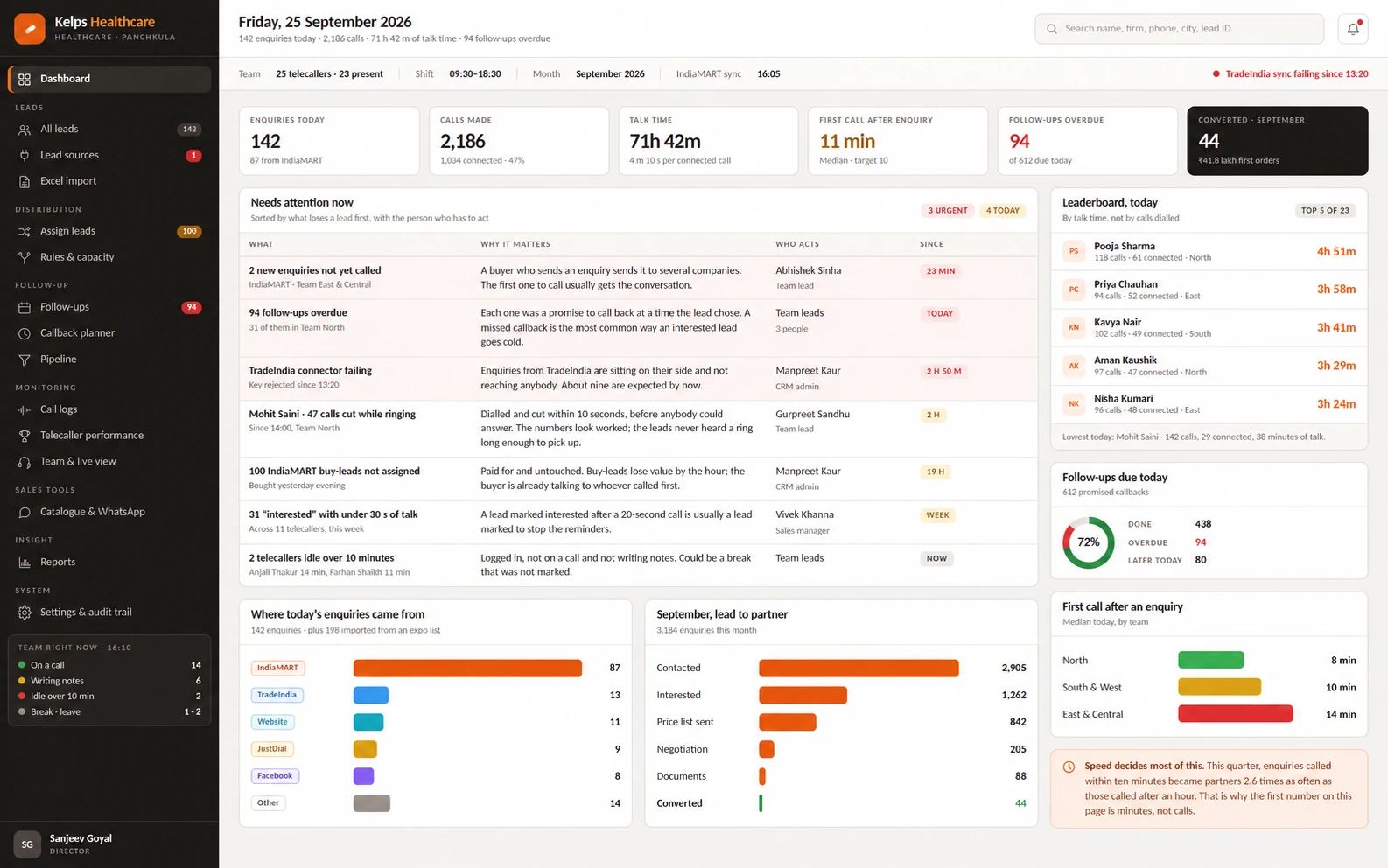
Follow-ups were missed. The owner lacked visibility.
The starting problem was operational. Follow-ups were not tracked properly, and lead data was effectively held by telecallers rather than being connected to an accountable owner with a complete view. That made it hard for the business to answer basic questions: Who received a new enquiry? Was the buyer called? What was agreed? Who is responsible for the next conversation?
Those gaps become more costly in a pharma sales process. An enquiry may arrive again from another source. A buyer may ask for a price list, documents or a particular district. A caller may promise to ring back after the buyer speaks to a partner. When each step is recorded separately, the next person has to reconstruct the story, and a missed promise can be difficult to spot until the prospect is cold.
Importing contacts adds another problem. A spreadsheet can contain repeat records, people already known to the business and numbers that cannot be called. Giving every row to a telecaller as if it were a fresh enquiry creates unnecessary work and can make the same buyer hear from more than one person. Lead intake, assignment and follow-up therefore had to be designed as one connected process.
- Follow-ups were not handled consistently
- The delivered workflow gives each callback a named lead owner and a planned time, with overdue work visible for review.
- Lead information stayed with individual telecallers
- A shared lead record connects source, ownership, conversation history and next action for the calling team and management.
A shared workspace, with clear responsibilities
The system needed a single record for each lead, including where the enquiry came from, who owns it, what the buyer wants, what has happened so far and what happens next. It also needed to distinguish new enquiries from repeat contacts and existing partners, support territory-based routing, and show when a caller is absent or already carrying a heavy queue.
Telecallers
See assigned leads, buyer requirements, earlier conversations and the next callback before making a call. Save the outcome and next action with the same record.
CRM administrators
Check lead-source status, validate imported contacts and preview assignments. Handle records that need correction or a manual ownership decision.
Owners and team leads
Review the shared lead history, overdue promises, caller activity and work that needs attention. See who is responsible for the next step.
The business owner and the assigned lead owner are different roles. The CRM gives management visibility into the process while keeping the person responsible for each buyer's next conversation clear.
Built around pharmaceutical enquiries
A custom pharmaceutical CRM needs to preserve the details that shape the sales conversation. In Kelps Healthcare's workflow, the lead record supports product interest, enquiry type, location and territory context alongside the communication history.
- PCD pharma franchise: keep the requested district, product range and territory discussion with the enquiry, so callers can continue the same conversation.
- Third-party manufacturing and bulk enquiries: record the buyer's requirements and apply the configured assignment workflow.
- Documents and commercial follow-ups: keep requested documents, price-list conversations and the next collection or callback task connected to the lead.
This context helps the next caller or manager understand what the buyer is trying to achieve. A sales stage becomes more useful when the record also explains what has been discussed and what still needs to happen.
Inside the custom CRM
These modules connect lead intake to the next conversation, with the same record available for management review.
01 Lead capture and source health
The CRM brings enquiries from the configured lead sources into a shared queue. Its lead-source screen covers marketplace leads, website forms, social leads, WhatsApp or missed-call enquiries, Excel uploads and manual entries. Connector status and last-arrival information help administrators see when a source needs attention. Lead intake is tied to the same ownership and follow-up workflow.
The source remains attached to the record after assignment. This lets the team understand whether it is handling a direct product enquiry, a repeat contact or an imported list, while source-health alerts make a connector issue visible to the administrator.

02 Cleaner Excel imports
Uploaded lists pass through column mapping and checks before they become leads. The import view separates new contacts, already known records, duplicates and unusable phone numbers. That gives the administrator a chance to correct an error and decide how new records should be assigned. An expo list can be handled differently from a direct product enquiry because the CRM keeps its source and context with each record.
Existing contacts keep their history when they appear in another list. The administrator can review the checks before committing the import, reducing the chance of turning the same buyer into several disconnected records.
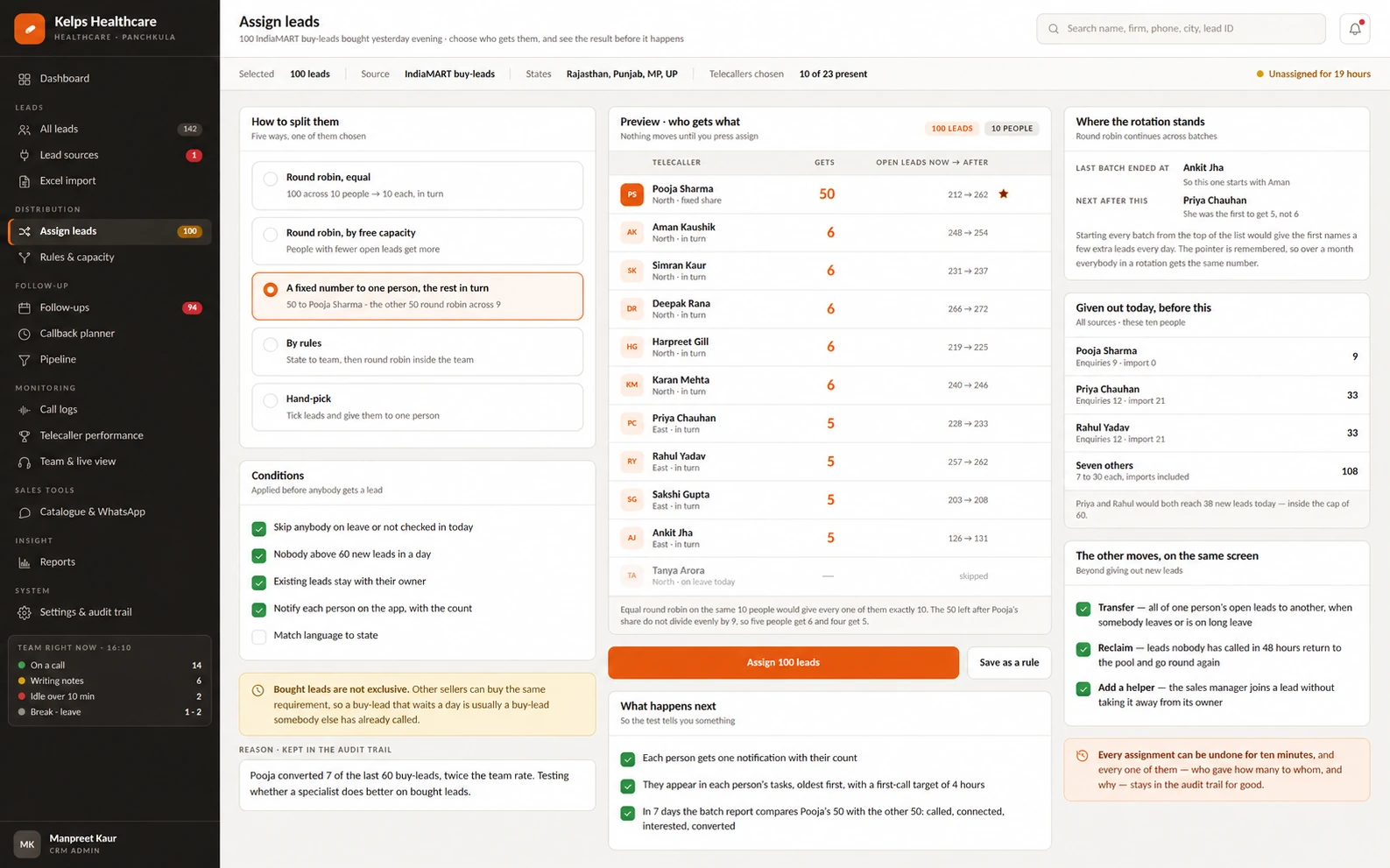
03 Assignment rules with a preview
Administrators can distribute leads by rotation, available capacity, territory and specialist rules, or make a manual decision when a batch needs special handling. The preview shows the proposed distribution before assignment is applied. Rules consider existing ownership, attendance, leave and capacity, helping repeat enquiries stay with the person who knows the buyer while new leads reach an available caller.
The assignment workspace also supports transfers and review of ownership changes. This makes a handover a visible part of the lead's history, keeping responsibility clear when a colleague is absent or a queue needs redistribution.
04 A complete lead record
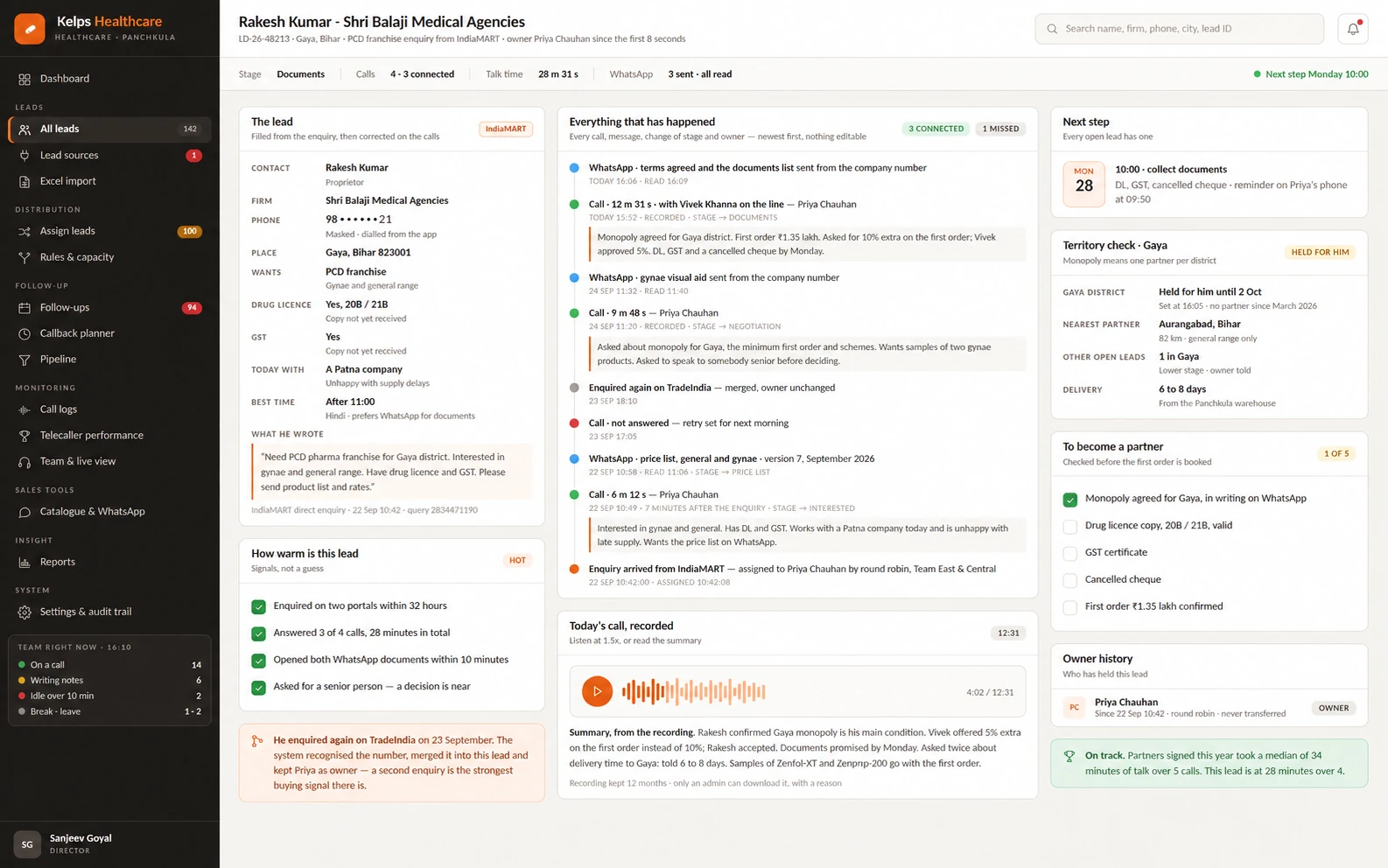
Each lead page connects the original request with the owner, source, sales stage, call and message timeline, notes, documentation tasks and next action. For a PCD franchise enquiry, the team can use territory and document checks in the same workspace. When a contact enquires again, the team can continue the existing conversation instead of treating them as a stranger.
The record gives management the same context that the telecaller uses: what was requested, what was discussed, what was sent and what is promised next. Information stays connected to the buyer even when more than one colleague contributes to the conversation.
05 Follow-up and callback planning
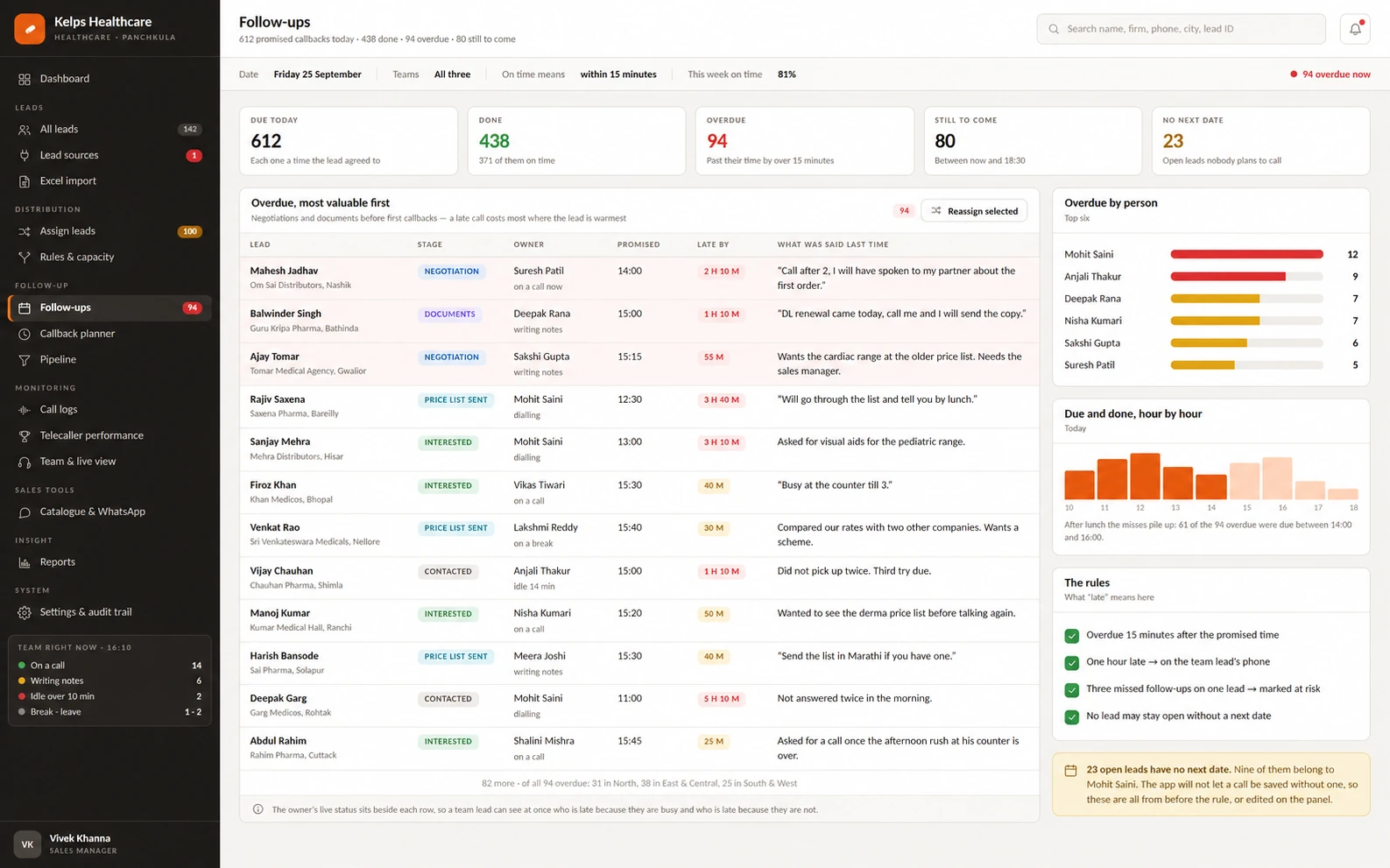
The follow-up view prioritises overdue promises and shows the agreed callback time beside the latest conversation. The callback planner groups work by telecaller and by hour, including the next working day. Open leads without a planned next step surface as exceptions. This turns “call later” into a named, dated task that managers can also see.
A team lead can review which promises are pending and use the latest note to understand why the callback matters. Planned callbacks remain connected to the lead and its responsible caller, so tomorrow's queue carries the same context as today's conversation.
06 Calling and team visibility
Call logs, recordings, notes and outcomes sit alongside each other for review. Performance screens distinguish calls dialled from connected conversations, time spent talking and on-time follow-ups. A team lead can inspect a short call or an outcome that needs review, while the live team view shows attendance, current activity and phone-health alerts.
These views let managers examine the work behind a sales stage. A flagged call can be reviewed with its notes and recording, and a device issue can be considered when a recording is missing. The screen supports a manager's review; the manager still interprets the conversation and decides the next action.

The owner can follow the work behind each lead
The original visibility gap was that lead data remained with telecallers. The delivered CRM connects that working data to management views. The owner can review an enquiry's source, assigned caller, latest communication, current sales stage and planned next step from the same process.
- New enquiries: which leads have an owner and which are waiting for a first call.
- Follow-up commitments: what is due, what is overdue and the conversation behind the promised callback.
- Calling activity: connected calls, talk time, recorded outcomes and items that need a closer review.
- Operational exceptions: source failures, import errors, unassigned leads and open records without a next action.
The dashboard helps identify an issue; the linked lead record explains it. A source alert can lead to a connector check, an unassigned record to an ownership decision, and a missed callback to the person responsible. These are live capabilities, without a claimed percentage improvement or revenue uplift.
From a new enquiry to the next promised call
- Arrival An enquiry about a franchise territory enters from a configured source with its original request preserved.
- Check The CRM checks whether the person is already known, so a repeat enquiry can stay connected to the existing record.
- Ownership Assignment rules route the lead to an available person with the appropriate territory or expertise.
- Conversation The caller sees the context, records the outcome and keeps notes or documents with the lead.
- Next step The promised callback becomes a scheduled task; overdue work is visible to the caller and team lead.
- Review Management can follow the same record from source to current owner, latest call and next action.
An illustrative journey through the live modules, rather than a measured conversion result.
Lead information stays with the business
The important change is that lead information no longer has to remain only with the telecaller who handled it. Source, ownership, communication history and promised next action are linked in the CRM. The team can see which enquiries are new, which are waiting for a first call, which callbacks are due, and which records need attention. An administrator can review assignment before sending a batch to the team; a manager can inspect activity without relying on a caller's personal notes.
The CRM and the modules described here are live. No verified before-and-after performance metrics were supplied; the screen figures are illustrative.
Lessons for pharmaceutical sales teams
A pharma CRM works best when it reflects how the business actually handles enquiries. First define what makes a lead new or a repeat, which enquiries belong to partner support, how territories are assigned, and when a callback counts as missed. Then build the screens and automation around those decisions. Treat import quality and connector failures as part of the sales workflow, because a lead that never enters the queue cannot be followed up.
For the owner, visibility needs to extend beyond a dashboard total. A useful system shows the person responsible, the evidence of a conversation and the next commitment on the same record. For telecallers, it should reduce the time spent searching for context and make the next action clear. This case study shows how those principles were brought together for Kelps Healthcare.
Common questions
What is a pharmaceutical lead management CRM?
It is a CRM configured for the enquiries, ownership rules, conversations, territory decisions and follow-ups of a pharmaceutical sales team. In this project, it connects lead sources, telecalling and management review.
Can the CRM keep repeat enquiries with the same person?
Yes. The assignment workflow checks for an existing lead first and can retain its current owner, keeping the conversation history together.
Can managers see overdue follow-ups?
Yes. The follow-up and callback views show promised times, overdue work, owners and the latest conversation context.
Is the CRM live or only a design?
The Kelps Healthcare CRM is live. The interface blueprints contain sample figures, so they are not used as evidence of performance results.
Give your team and business owner one clear view
If enquiries arrive in several places while ownership and follow-ups remain unclear, we can map your process and define a CRM around the work your team does every day.
Explore our custom software development services.